
Written and reviewed by the team operating TempMail Cloud. Product claims are checked against our live service and our editorial standards.
Create a separate receive-only inbox for each authorized QA identity or test run, trigger the email workflow, and verify what a user actually receives. Check sender, subject, body, links, OTP, timing, and repeated-send behavior. Use synthetic data and never test systems you do not own or have permission to assess.
Why email testing needs real inboxes
An application can report “email sent” even when the recipient gets a broken template, a stale link, a missing variable, or no message at all. Unit tests around the mail function are useful, but they do not reproduce DNS, delivery, parsing, HTML rendering, and user interaction at the receiving end.
A temporary inbox gives a tester a real recipient without filling a personal or shared work account. A fresh address also prevents an old verification code from being mistaken for the current run. TempMail Cloud’s no-auto-expiry model lets the same test identity continue across a multi-day regression when continuity is valuable.
Map inboxes to test cases
Use one address per role, scenario, or execution when isolation matters. A registration test might use a fresh random address. A lifecycle test that covers signup, invitation, plan change, and cancellation may use one durable custom address. Record the mapping in the test case so another tester can reproduce the flow.
Do not encode real customer names, production identifiers, secrets, or confidential project details in the address. Neutral conventions such as environment, role, and run number are easier to manage and safer to show in screenshots.
Inspect more than delivery
- Stored sender address shown by the receiving inbox
- Subject, received timestamp and intended preheader in a target mail client
- Plain-text fallback and HTML body
- Personalization variables and escaping
- OTP length and expiry behavior
- Verification, invitation, and reset link destination
- Button label, keyboard access, and mobile layout
- Duplicate sends, retry behavior, and ordering
The standard inbox stores the receiving-envelope sender as its sender field; it does not separately expose every original From or authentication header. Compare envelope and visible From identities through your sending provider, raw-message diagnostics or a mail client with full-header support. Check attachment handling outside this viewer.
Open the link in the correct environment and confirm that it is single-use where expected. Never publish an active reset token or OTP in a bug report. Redact message content before sharing evidence outside the authorized team.
Use long-lived and disposable identities deliberately
Fresh disposable addresses are ideal for signup uniqueness, first-run onboarding, and parallel roles. Stable password-protected mailboxes are better when the test needs follow-up notices or an account that survives deployments. TempMail Cloud supports both patterns without forcing a ten-minute expiry.
Long-lived test data can create clutter and false positives. Add a cleanup step to the test plan and delete obsolete messages or mailboxes after evidence is recorded. If a test account becomes part of a permanent demo or monitoring system, move it to a managed organizational mailbox.
Test failure paths, not only success
Request several codes under controlled conditions and check earlier values against the sender's documented replacement policy. Try an already-used link, an expired link, and a link opened in a different browser. Confirm that the application does not reveal whether an unrelated address exists when that would enable account enumeration.
For reset and authentication workflows, rate limiting and generic responses matter. OWASP guidance emphasizes that password-reset paths must not become a weaker route into an account. Temporary inboxes help observe the email output, but they do not replace server-side security testing.
Understand the viewer boundary
TempMail Cloud displays HTML email in a restricted sandbox so message scripts cannot run in the main application. This is safer for users, but it is not a pixel-perfect substitute for Gmail, Outlook, Apple Mail, or a dedicated cross-client rendering service. Use it to validate content and workflow, then test critical campaigns in the target clients.
Links, remote images, and attachments should be treated as untrusted even in a test environment. Keep staging isolated, use synthetic recipients, and avoid routing real customer mail into a temporary service.
Build a repeatable QA checklist
Record the sender action, recipient, expected template, expected token or link behavior, arrival time, actual result, and cleanup status. For automated suites, use unique correlation data in the address or message so retries can be matched without relying only on arrival order.
TempMail Cloud currently provides a human-facing inbox rather than a promised public automation API. Do not design CI around undocumented endpoints. For manual and exploratory testing, the visible inbox, search, filters, and multiple owned addresses provide a practical evidence trail.
Related TempMail Cloud guides
Original QA artifact and browser observation
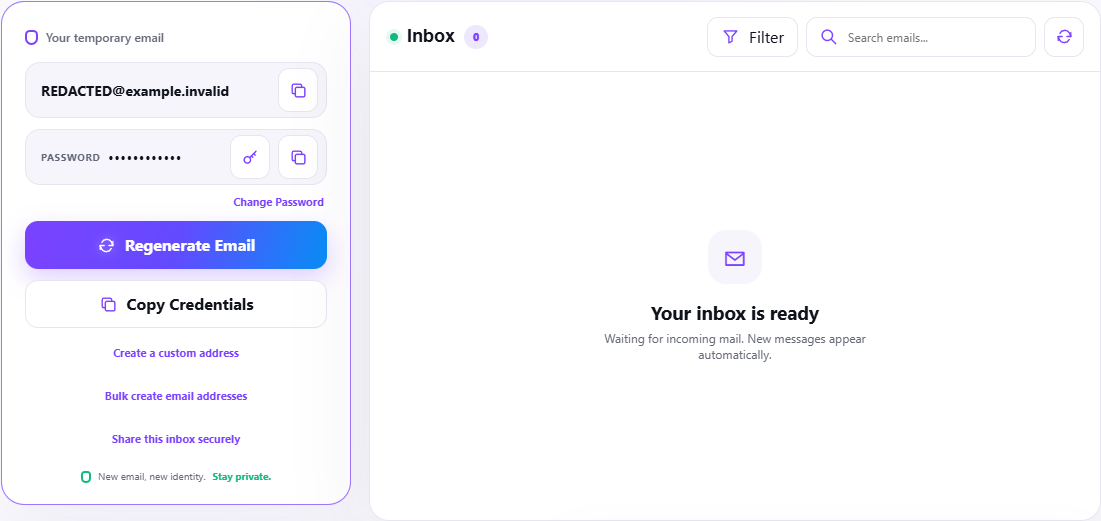
We captured the live reusable inbox workspace on 29 September 2026 with the generated address redacted. View the redacted workspace screenshot. It shows the password-protected mailbox controls, regenerate action, custom-address path, credential copy action, filters and empty inbox state actually presented by TempMail Cloud.
The companion email QA matrix covers signup, resend, expiry, replay, wrong-browser/account state, HTML/text rendering, measured delivery delay and cleanup. It is designed to be filled with UTC timestamps and redacted artifacts from an authorized system.
Choose evidence that proves the outcome
For delivery timing, record both the application trigger and inbox arrival in UTC; a single screenshot cannot measure latency. For links and OTPs, retain a redacted identifier or hash rather than the live value. For account verification, record the user state before the first use, after success and after replay.
What this review did not test
The screenshot proves the visible TempMail Cloud workflow on the review date. It does not prove deliverability from every sender, pixel parity with Gmail or Outlook, attachment safety, or the security of the application being tested. Those checks remain the QA team's responsibility.