Written and reviewed by the team operating TempMail Cloud. Product claims are checked against our live service and our editorial standards.
Choose 10 minute mail when you need one low-risk message and never expect to return. Choose password-protected temp mail when a site may send follow-ups or you want to reopen the same inbox later. Neither option is appropriate for sensitive or irreplaceable accounts.
The core difference is control over time
A classic 10-minute inbox is intentionally short. The provider creates an address, starts a countdown, receives messages during that window, and removes the inbox when time runs out. That design minimizes storage and makes the decision simple: use it once and leave.
Reusable temp mail separates the identity without forcing immediate expiry. TempMail Cloud issues credentials and currently does not automatically delete the mailbox. Users can manage messages or request deletion under the service policy; forgetting or detaching an inbox does not itself erase the server mailbox. This is useful when delivery is delayed, a service sends a second code, or a test scenario continues after the original browser session.
Comparison at a glance
- Expiry: 10 minute mail expires on a timer; TempMail Cloud has no automatic mailbox expiry
- Login: many timed inboxes have no reusable password; TempMail Cloud supports mailbox credentials
- History: timed history disappears; reusable history remains until deletion
- Multiple addresses: an account can own and switch among several TempMail Cloud inboxes
- Best fit: timed mail for one-off low-risk delivery; reusable mail for repeated low-risk receiving and testing
- Shared limit: neither guarantees sender acceptance or replaces a full permanent email provider
The right choice depends on the consequence of losing access, not only on speed. Short expiry is a feature when you want minimal persistence. Durable access is a feature when a workflow needs continuity.
When 10 minute mail is the cleaner choice
Use a timer-based inbox for a single download link, a one-time demo, a disposable survey confirmation, or another low-stakes interaction that will never need account recovery. The quick deletion reduces the amount of message data retained by that provider and removes the burden of saving another password.
Do not stretch a ten-minute address into a long-term identity. A delayed email may arrive after expiry, and a website may later require confirmation from the original address. If that possibility exists, choose a reusable inbox at the beginning rather than hoping the countdown can be extended.
When reusable temp mail is better
Password-protected temp mail is better for multi-day QA, repeated OTP testing, staged onboarding, low-risk subscriptions, and services that send notices over time. It is also useful when you create a memorable custom address or need several role-based test identities attached to one registered account.
The benefit is continuity, but continuity increases responsibility. Save credentials, delete messages you no longer need, and use a unique password. More retention also means more data exists if an account is compromised, so do not store sensitive messages merely because the inbox can stay active.
Privacy and security are not identical
Both tools reduce exposure of a primary address, but neither makes browsing anonymous. The sender still sees the temporary address and may collect IP, device, cookie, payment, or account information through its own service. Temp mail is an email-separation layer, not an invisibility tool.
A password reduces unauthorized mailbox access, while a short lifetime reduces how long messages remain. Each design protects a different risk. For important accounts, neither is enough: use a permanent provider, multi-factor authentication, reliable recovery, and ideally a passkey or security key.
A simple decision rule
Use the return test: if you might need to return after today, avoid a countdown inbox. Then use the loss test: if losing the inbox could affect money, health, identity, work, or an irreplaceable account, avoid temporary email entirely. Finally use the reply test: if you must send or reply, TempMail Cloud’s receive-only service is not the right tool.
These three checks are faster and more useful than choosing a provider because it promises “unlimited” or “forever.” Match retention and capabilities to the real task.
Additional practical guidance
Before relying on a reusable inbox, save its credentials and confirm access in a separate browser while retaining your current session. If you test receiving, send only a harmless authorized message. Confirm that the sender, subject, HTML, links, and timestamp still render. This pre-flight test reveals expiry and rendering behavior more reliably than a label such as temporary or permanent.
Related TempMail Cloud guides
Optional timed mode
The reusable behavior described here applies to the default inbox. You can now explicitly create a separate 10-minute guest inbox. Its fixed deadline blocks all access and schedules live-message deletion; it cannot be extended or recovered. Existing reusable inboxes are not converted. Backup retention follows our privacy policy.
Hands-on check performed on 29 September 2026
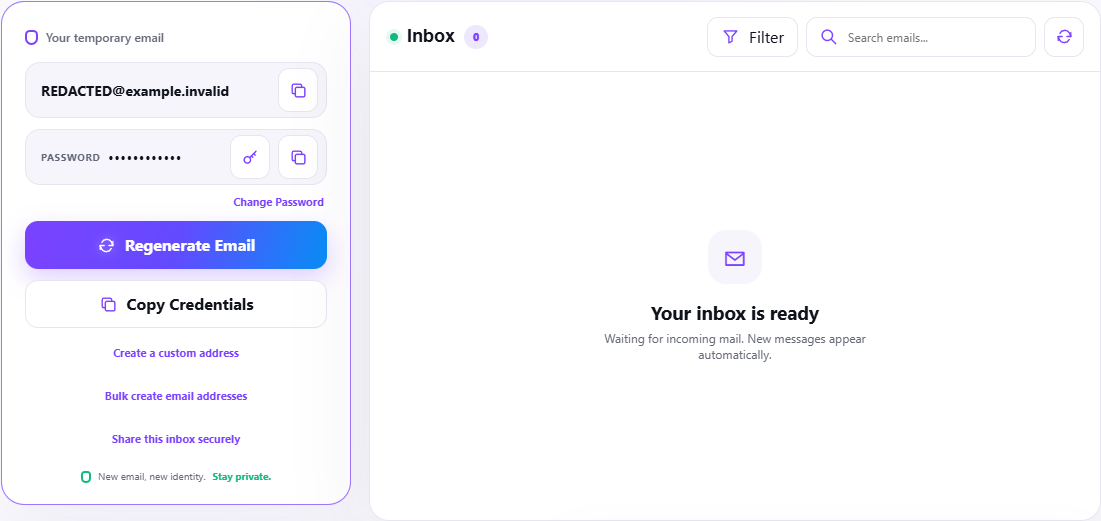
We opened both TempMail Cloud modes in a clean browser session. The reusable workspace displayed an address plus password and controls to copy credentials, regenerate the address, create a custom address and share access. View the redacted reusable-inbox capture.
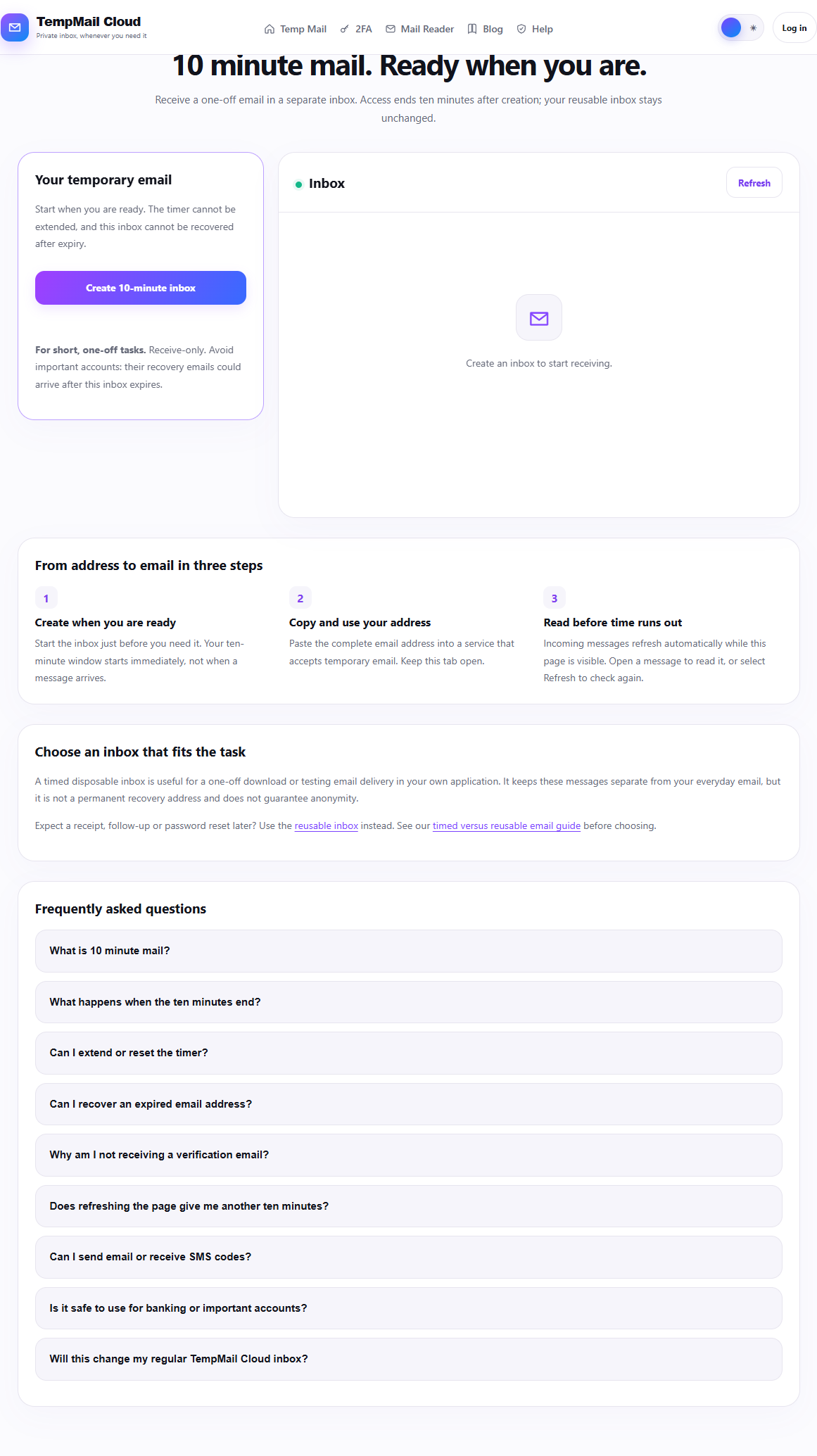
The 10-minute page kept creation explicit: before pressing the button it stated that the timer starts at creation, cannot be extended and the inbox cannot be recovered after expiry. View the timed-inbox capture. We did not create a timed inbox merely to produce editorial evidence.
What the comparison measured
- Return-access control: password and credential controls visible in the reusable workspace; no recovery promise on the timed page.
- Expiry contract: no fixed ten-minute countdown on the reusable workspace; explicit ten-minute expiry on the timed page.
- Intended task: repeat/follow-up receiving versus a short one-off task.
- Shared limits: both are receive-only and neither guarantees third-party acceptance, delivery or anonymity.
The full dated observation record separates what was seen from what was not tested.
Limits of the hands-on check
This was a product-behavior review, not an uptime or deliverability benchmark. It did not send a message, measure provider delay or test recovery after an infrastructure event. Those results would require a controlled sender and a longer observation window.